PackMyDocs Global

Back from a work trip? Turn receipts into a reimbursement packet.

Upload receipts, tickets, hotel invoices, taxi records, mileage notes, agenda, and employer policy. Get an expense report PDF, CSV, policy-flag checklist, and receipt index to review before submitting.

See sample packet

Your employer's policy controls approval. PackMyDocs organizes and flags; it does not approve expenses.

  • Employer-policy aware
  • No approval promises
  • PDF plus CSV output

8 categories

Air, hotel, meals, ground transport, mileage, parking, fees, other.

CSV export

Clean rows for finance, client billing, or project accounting.

1 PDF packet

Summary, report, receipt index, and missing-proof flags.

What you get back

From that pile of files to this packet

Tessa's client-site trip: hotel invoice, rideshare receipts, meal photos, and meeting agenda turned into an expense report, CSV table, and receipt index.

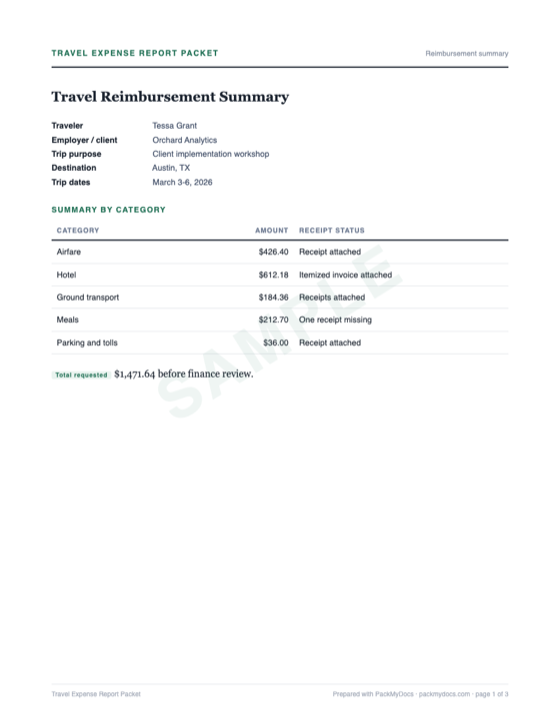
Employee Travel Expense Report Packet sample: Reimbursement summary
PAGE 01 / Reimbursement summary
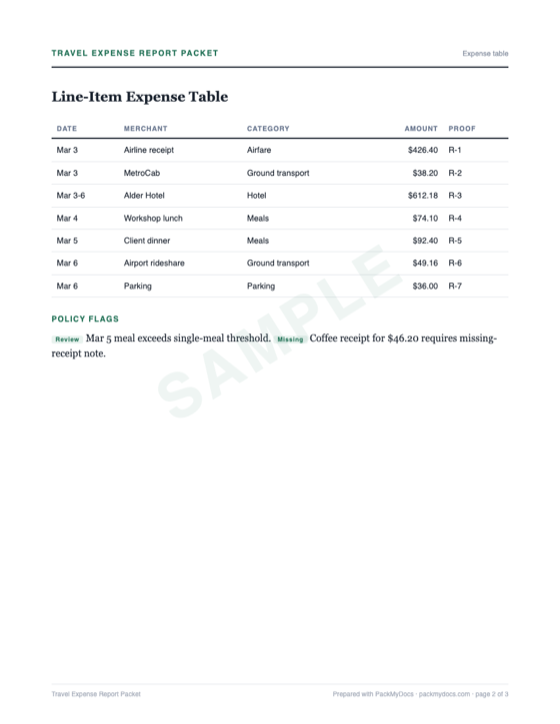
Employee Travel Expense Report Packet sample: Expense table
PAGE 02 / Expense table
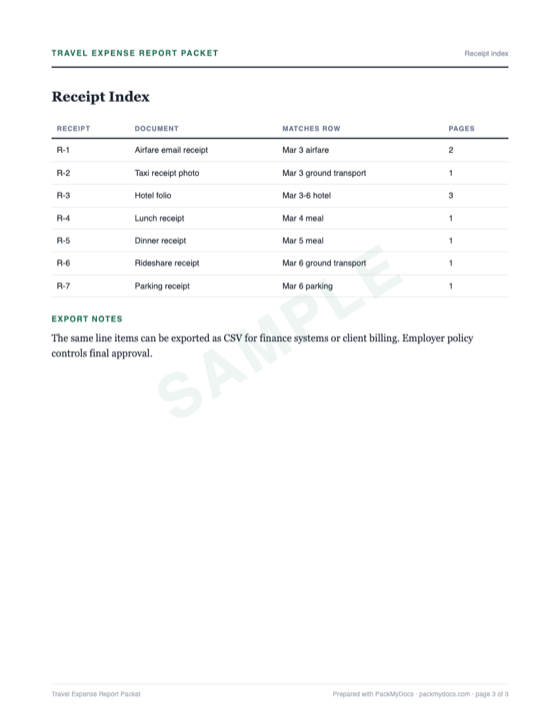
Employee Travel Expense Report Packet sample: Receipt index
PAGE 03 / Receipt index
01

A reimbursement report with traveler, trip purpose, dates, project, categories, and total requested

02

A line-item expense table with date, merchant, amount, currency, category, and receipt status

03

A missing-receipt and policy-flag checklist for review before submission

04

A receipt index that matches every line item to its proof

05

One PDF packet plus CSV export for finance, employer portal, or client billing

Take the full packet with you

Download the complete sample PDF and see, page by page, how the finished packet is structured.

PDF3 pagesReimbursement summaryExpense tableReceipt index

How it works

Three steps. None of them painful.

1

Upload what you have

Photos, PDFs, screenshots, forwarded emails — in any order, straight from your phone. Messy is fine; that's the job.

2

We build your packet

Everything gets sorted, named, and assembled — the letter drafted, the timeline dated, every document numbered and indexed.

3

Download, review, and send

One clean PDF for wherever it needs to go — a dispute portal, an email, a printer. You review it before using it.

Is this you?

Made for exactly this situation

You need to submit a work travel expense report after a trip
You are a consultant billing client travel back to a project
You have receipts across email, apps, photos, and card statements
You want finance to see the trip purpose, categories, and missing receipts at a glance

Receipt checklist

Gather these first

Expense reports are annoying because the proof is fragmented: a hotel PDF, taxi app receipts, meal photos, calendar invites, and a policy PDF. Upload it all. PackMyDocs turns the trip into a clean reimbursement packet.

0/7 Tick off what you have.

Tick off what you already have — progress stays on this device.

After you hit send

How the process usually goes

STEP 1

Group by trip and purpose

Finance teams need to know why the expense happened, not just what was bought. The packet starts with trip dates, destination, and business purpose.

STEP 2

Match each row to proof

Every expense line should point to a receipt, invoice, statement, or missing-receipt note. This makes review faster.

STEP 3

Flag policy questions

PackMyDocs can flag missing receipts, unclear categories, personal items, or policy thresholds for you to review. It does not approve them.

STEP 4

Submit and keep the archive

Upload the CSV or PDF where your employer asks, then keep the packet as your record for finance questions or client reimbursement.

Get started

Skip the weekend of paperwork

Upload your documents and get back an organized packet you can review, download, and use where it needs to go.

Common questions

How much does it cost?

Previewing the checklist and sample packet is free. If you decide to build your own finished expense report packet, it costs $15.

What do I actually upload?

Hotel invoices, flight receipts, meal receipts, rideshare PDFs, taxi photos, parking receipts, mileage notes, meeting agenda, employer policy, and card statements if needed.

Can PackMyDocs approve my reimbursement?

No. Your employer or client approves expenses. PackMyDocs organizes the report and flags issues for your review.

What if I lost a receipt?

Upload the card statement, app history, calendar context, or missing receipt declaration if your policy allows it. The packet marks it as missing proof.

Can it handle multiple currencies?

The packet can list original currency and converted amount for review. Your employer's policy controls exchange rates and reimbursement currency.

Is this tax advice?

No. PackMyDocs prepares reimbursement records. It does not decide tax treatment, accountable-plan compliance, or deductibility.

This workflow is opening soon

One email when it opens — no spam, ever. Unsubscribe anytime.