PackMyDocs US

Tax receipts everywhere? Turn the pile into a CPA-ready binder.

Upload receipts, invoices, 1099s, card statements, bank exports, and mileage logs. Get a categorized expense table, income-source checklist, missing-proof flags, and one organized PDF/CSV set to review with your preparer.

See sample packet

PackMyDocs organizes records only. It does not decide deductions, prepare a return, or provide tax advice.

  • IRS recordkeeping grounded
  • No deduction advice
  • CPA-ready organization

7 record groups

Receipts, invoices, 1099s, statements, mileage, home office notes, contracts.

CSV export-friendly

Categorized rows your preparer can filter and review.

1 PDF binder

Source documents indexed and grouped by category.

What you get back

From that pile of files to this packet

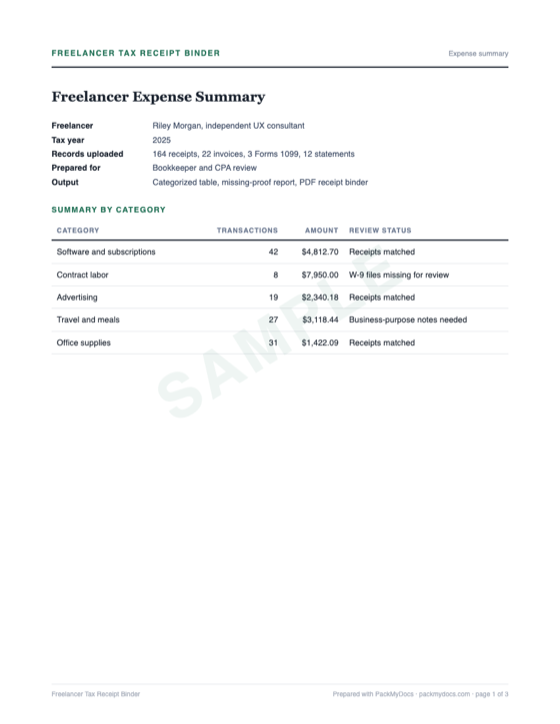
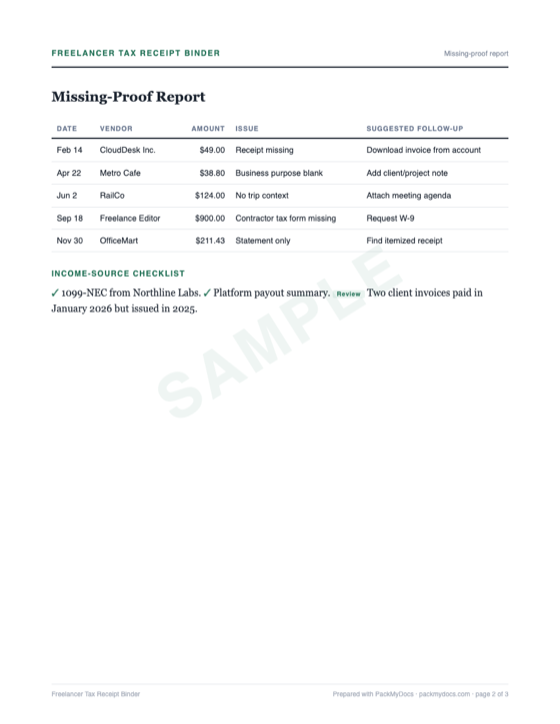
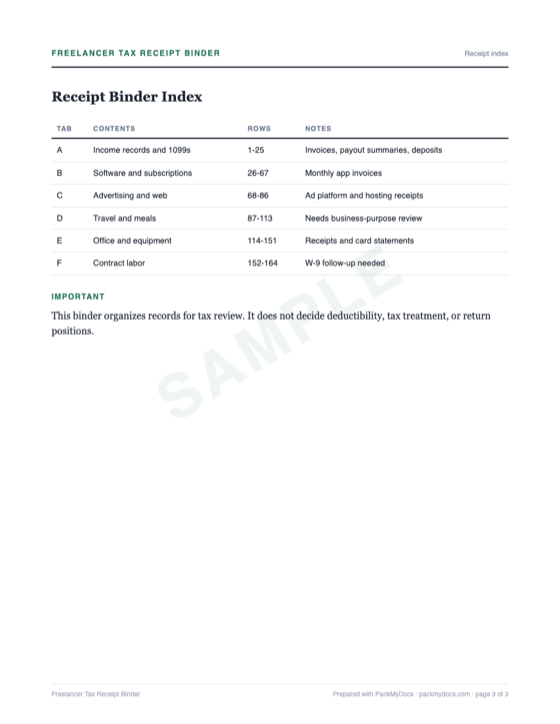
Riley's freelance year-end cleanup: receipts, invoices, 1099s, and card statements turned into a categorized table, missing-proof report, and receipt binder.

Freelancer Tax Receipt Organizer sample: Expense summary
PAGE 01 / Expense summary
Freelancer Tax Receipt Organizer sample: Missing-proof report
PAGE 02 / Missing-proof report
Freelancer Tax Receipt Organizer sample: Receipt index
PAGE 03 / Receipt index
01

A categorized expense table with date, vendor, amount, payment source, category, and proof status

02

An income-source checklist for invoices, 1099s, platform payouts, and bank deposits

03

A missing-proof report showing transactions that need receipts, notes, or review

04

A PDF receipt binder grouped by category and indexed by row number

05

A CSV export for your CPA, bookkeeper, or accounting system

Take the full packet with you

Download the complete sample PDF and see, page by page, how the finished packet is structured.

PDF3 pagesExpense summaryMissing-proof reportReceipt index

How it works

Three steps. None of them painful.

1

Upload what you have

Photos, PDFs, screenshots, forwarded emails — in any order, straight from your phone. Messy is fine; that's the job.

2

We build your packet

Everything gets sorted, named, and assembled — the letter drafted, the timeline dated, every document numbered and indexed.

3

Download, review, and send

One clean PDF for wherever it needs to go — a dispute portal, an email, a printer. You review it before using it.

Is this you?

Made for exactly this situation

You are self-employed, a contractor, creator, consultant, or side-gig worker
Your receipts, invoices, and statements are scattered across email, apps, and photos
You want a clean expense file for a CPA or tax preparer
You need to find missing proof before tax season or bookkeeping cleanup

Records checklist

Gather these first

Recordkeeping is not the glamorous part of freelancing, but it is the part that makes tax season survivable. Upload your receipts and statements as-is. PackMyDocs sorts them into categories, flags missing support, and creates a review binder for you and your preparer.

0/7 Tick off what you have.

Tick off what you already have — progress stays on this device.

After you hit send

How the process usually goes

STEP 1

Separate records from decisions

PackMyDocs organizes records and categories for review. Your preparer decides tax treatment, deductibility, and final return positions.

STEP 2

Match receipts to statements

A receipt shows what was bought; a statement shows payment. The packet pairs both when possible and flags unmatched items.

STEP 3

Keep categories consistent

Advertising, software, supplies, travel, meals, fees, and professional services should be easy to scan and audit.

STEP 4

Review before filing

The binder is a review tool. Confirm business purpose, remove personal expenses, and ask your preparer about anything uncertain.

Get started

Skip the weekend of paperwork

Upload your documents and get back an organized packet you can review, download, and use where it needs to go.

Common questions

How much does it cost?

Previewing the checklist and sample binder is free. If you decide to build your own finished tax receipt organizer, it costs $15.

What do I actually upload?

Photos of receipts, PDF invoices, 1099s, bank statements, card statements, mileage logs, app exports, subscription emails, and old bookkeeping category lists.

Does PackMyDocs tell me what I can deduct?

No. PackMyDocs organizes your records for review. A CPA, enrolled agent, or tax preparer should decide deductions and tax treatment.

What if I am missing receipts?

The organizer flags rows with weak support. You can add receipts later, attach statements, or ask your preparer what additional proof is needed.

Can I get a CSV?

Yes. The packet includes a CSV-style expense table so a preparer can filter by category, amount, vendor, and proof status.

Is this tax advice?

No. PackMyDocs is a record organizer. It does not prepare returns, calculate deductions, or advise on tax positions.

This workflow is opening soon

One email when it opens — no spam, ever. Unsubscribe anytime.